












How to Remove All People from a Picture While Keeping the Background Intact
You’ve finally captured that perfect moment: the golden hour is hitting just right, your composition is impeccable, and the landscape behind you is breathtaking. You rush home, ready to share your masterpiece, only to discover it—the dreaded photobomber. Whether it’s a random stranger, a distracting tourist, or even an unintentional shadow, that one unwanted element can instantly deflate the beauty of your shot. The sheer frustration of an otherwise flawless image being ruined by a fleeting background presence is a feeling every modern photographer, from hobbyist to professional, knows all too well.
For years, fixing this required cumbersome software like Photoshop and a painstaking process of cloning, patching, and blending, reserved only for those with professional-level editing skills. But what if you could easily remove person from photo online free and achieve a magazine-quality result with just a few clicks? Today, thanks to the revolutionary advancements in ai image replacer technology, you absolutely can. The power to effortlessly clean up your pictures and focus purely on your subject is now universally accessible. The days of accepting a “good enough” photo are over.
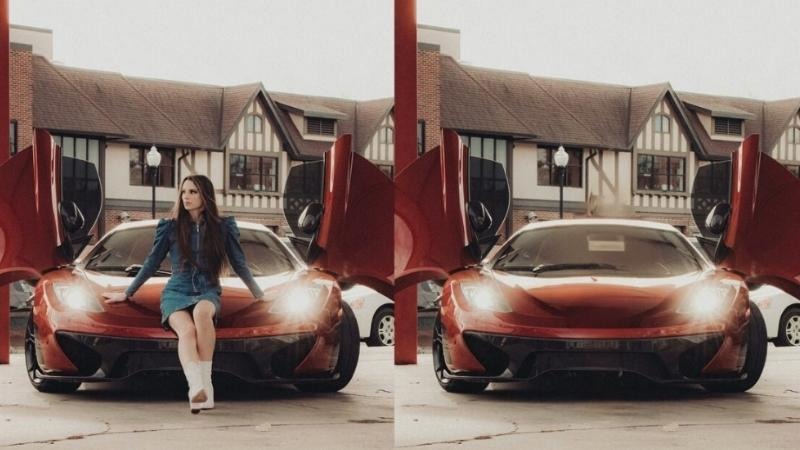
The Secret Weapon Against Photobombers: How AI Works
The secret behind flawlessly removing people and objects from photos without compromising the background lies in sophisticated computational intelligence. Traditional photo editing tools often rely on manual selection and simple cloning, which frequently results in blurry, repetitive, or noticeable smudges where the unwanted person once stood. This is especially true when dealing with complex or highly detailed backgrounds like intricate architecture, water, or dense foliage. The manual reconstruction required to make a removal look natural is what used to take hours of work.
AI Object Removal tools, such as the one featured in BeautyPlus, operate on a completely different level. When you highlight a person you want to remove, the underlying AI doesn’t just “cut and paste” from another part of the image. Instead, it uses deep learning models—trained on millions of images—to understand the context of the surrounding pixels. The software analyzes the texture, color, and pattern of the background immediately adjacent to the unwanted person, and then intelligently generates entirely new, contextually appropriate information to seamlessly fill the void. This is the difference between a clumsy edit and a professional-grade cleanup.
This level of intelligent content-aware fill is game-changing. It means you can completely erase a person from a crowded beach shot, and the AI will automatically extend the sand, waves, and distant horizon in a way that is perfectly natural and indistinguishable from the original scene. This technology ensures that your travel photos look like you had the entire destination to yourself, your e-commerce product shots are clutter-free, and your landscapes remain pristine. It puts the power of complex, generative photo editing right at your fingertips.
How to Remove Someone from Pictures? The Simple BeautyPlus Method
Achieving a clean, distraction-free photo is easier than you think with the BeautyPlus AI Object Remover. Forget complicated menus and layers; the process is streamlined for speed and precision. Here is the straightforward, three-step method to clean up your cherished memories and professional shots:
Upload Photo
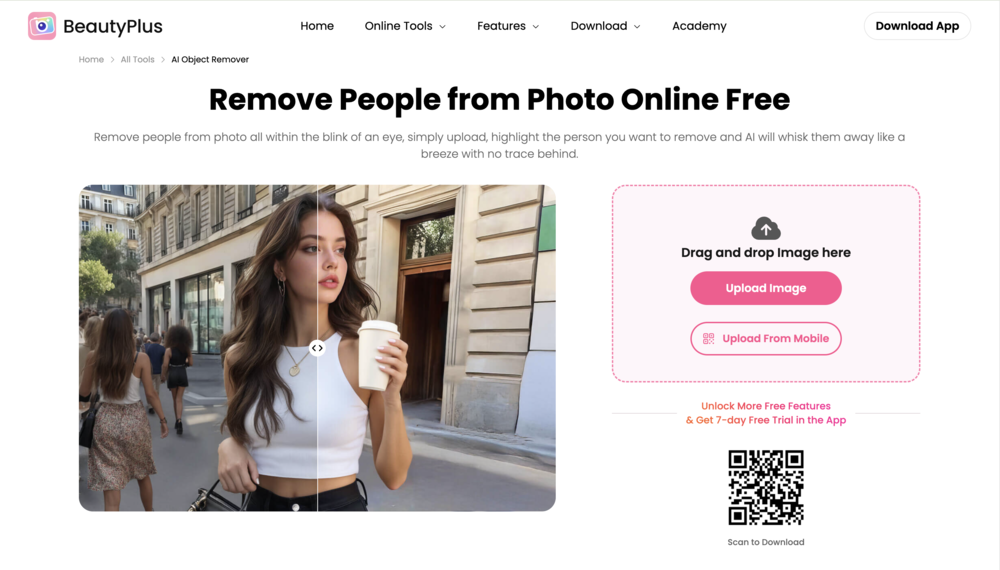
First, navigate to the BeautyPlus AI Object Remover tool. Click the “Upload Image” button. Choose the photo you want to edit from your device’s folder. You can also drag and drop the image directly into the software, making it incredibly convenient whether you’re on a desktop or mobile device.
Remove People
Once the photo is uploaded, select the Magic Eraser or Remover tool. Adjust the brush size as needed to comfortably cover the person you want to erase. Then, use your mouse or finger (on a touchscreen device) to highlight the area you want to remove. Simply brush over the entire unwanted subject. The underlying AI technology will automatically detect and erase the selected content, seamlessly blending the background back together in mere seconds.
Save & Share
When you’re happy with the flawless result—and trust us, you will be—click the “Save” or “Export” button to download the newly edited, people-free photo to your device. You now have a clean, professional-looking image ready to be shared on any platform.
Beyond People: The Versatility of AI Object Removal
While eliminating a photobomber is the primary use case, the BeautyPlus AI Object Remover is a versatile, multi-purpose tool that extends far beyond just people. Its core technology can magically erase virtually any unwanted element, significantly boosting the quality and impact of your images for a wide array of uses.
Think about the ubiquitous clutter that often creeps into photos. You might have a stunning indoor shot, but there’s an unsightly trash can, a tangled power cord, or an accidental stray piece of furniture. In e-commerce, product photography demands a pristine, distraction-free environment; the AI tool can instantly remove logos, dust, or props that take the focus away from the product itself. The same goes for architectural or real estate photos, where removing signs, vehicles, or construction debris is crucial for presenting a property in its best light.
Furthermore, this tool is invaluable for restoration and refinement. Have an old, cherished family photo marred by scratches, spots, or dust? The AI can treat these blemishes like any other “unwanted object,” erasing them and regenerating the surrounding texture to restore the picture to its original glory. For portraiture and social media use, it’s perfect for removing temporary imperfections like a stray hair, a shadow, or even distracting elements in the corner of a frame. By providing such a comprehensive cleanup solution, BeautyPlus ensures every single element in your picture serves your creative vision. It’s an indispensable part of your editing workflow, saving you time and delivering consistently spectacular results.
Bottom Line
The perfect picture is finally within reach. You no longer have to settle for a beautiful scene ruined by a momentary distraction. By leveraging the advanced capabilities of the BeautyPlus AI Object Remover, you gain the power to effortlessly remove people and objects while ensuring the background remains perfectly intact and natural. It’s fast, incredibly accurate, and completely transforms your photo editing workflow. Say goodbye to photobombers and hello to pristine, professional-quality images that tell the story you want to tell.