















5 Best Video Recovery Software

If you lost important video files due to accidental deletion, drive formatting, or SD card damage, the main concern is simple: can the footage still be restored in full and without corruption? We tested multiple tools on formatted drives, damaged SD cards, and permanently deleted footage to determine which solutions actually recover playable files.
Below are the video recovery tools that delivered consistent results in real recovery scenarios.
Do’s and Don’ts of Video Recovery
Before we move to the review of the top tools, we want to address an important factor that directly affects recovery success. The actions taken immediately after data loss can either preserve recoverable sectors or permanently reduce your chances.
What you should do:
- Stop using the affected drive immediately
- Disconnect SD cards or external drives after data loss
- Install recovery software on a different drive
- Create a disk image before recovery if the drive shows errors
- Use full scan mode for formatted or corrupted storage
- Preview video files before export to verify playback integrity
What you should avoid:
- Do not save recovered files to the same drive
- Do not install new software on the affected partition
- Do not format the drive again after data loss
- Do not record new footage on the same card
- Do not rely only on file names without preview verification
These precautions significantly increase the probability of full video restoration, especially for large files such as 4K recordings from cameras and drones.
How We Tested and Ranked These Video Recovery Tools
The choice of reliable video recovery software requires more than attention to price or brand visibility. Marketing materials highlight feature lists, but actual recovery results appear only under controlled data-loss conditions. For this reason, our evaluation relies on structured assessment across multiple failure scenarios rather than promotional claims.
Note: if you take videos with a camera – it may also be useful to understand the top causes of video corruption on cameras — knowledge that can help you avoid data loss before it happens, from improper ejection to file system errors or sudden power loss during recording.
To identify which solutions deliver consistent results, each program was reviewed according to the following criteria:
| Parameter | Description |
| Recovery performance | Primary attention went to restoration accuracy across real failure cases: accidental deletion, full drive format, partition corruption, and damaged SD cards. Large and fragmented 4K files served as a benchmark, since many tools locate them but fail to rebuild stable, playable footage. |
| Interface structure | A clear workflow determines how efficiently a user moves from scan selection to file export. Logical navigation, precise filtering tools, and transparent result display reduce errors and shorten recovery time. Overly technical menus without measurable recovery benefit lowered evaluation scores. |
| Video format compatibility | Broad format recognition increases recovery probability across different devices. Support for MP4, MOV, AVI, MKV, and camera-specific file types, footage from drones, action cameras, and professional equipment remains detectable and restorable. |
| Preview reliability | Playback preview plays a critical role in verification. A dependable solution must allow full file review before export, since file detection alone does not confirm structural integrity or playback stability. |
| Licensing transparency | Clear recovery limits and transparent pricing structure matter as much as technical capability. Trial versions must allow realistic evaluation without hidden export restrictions that prevent proper software assessment. |
Top 5 Video Recovery Software
Our list includes the strongest tools available today, each of which secured its position through proven recovery performance. These solutions restored playable video files after deletion, drive format, and SD card errors.
The list features both paid and free video recovery software. While premium tools offer advanced reconstruction features, several free options delivered results that closely matched paid alternatives in common recovery cases.
1. Disk Drill
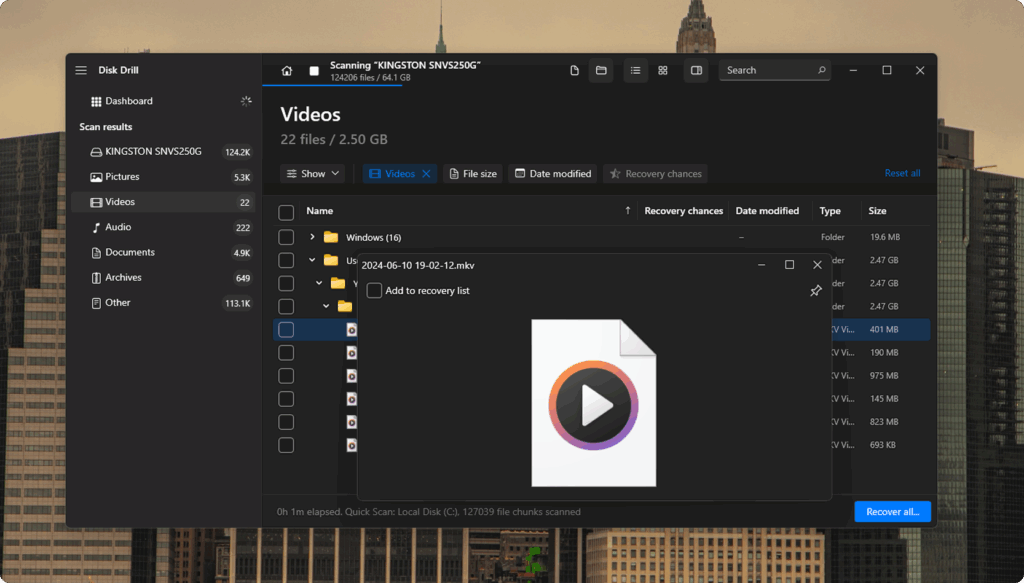
Highest in our ranking and first among the best performers stands Disk Drill Data Recovery. This solution secured the top position due to consistent restoration accuracy, advanced reconstruction capability, and stable performance across complex data-loss cases. Among all tested options, it delivered the strongest balance between deep scan power and practical usability, which positions Disk Drill as the current leader in the best video recovery software category.
Disk Drill restores video files after accidental deletion, drive format, partition damage, RAW errors, and SD card corruption. It supports recovery from HDD, SSD, USB flash drives, memory cards, and external storage devices.
The software also includes a specialized Advanced Camera Recovery module built to reconstruct fragmented footage from GoPro, DJI, Canon, Sony, Panasonic, and other camera brands. The program supports over 390 file types, including MP4, MOV, AVI, MKV, FLV, 3GP, and various professional camera formats.
OS Support: Disk Drill runs on Windows 11, 10, 8, and 7. A separate version supports modern macOS systems with regular compatibility updates for recent macOS releases.
Software plan: The free version on Windows allows recovery of up to 100MB of data. macOS users can perform full scans and preview recoverable files before purchase. The PRO license costs $89 for a subscription and $149 for a lifetime personal license with unlimited recovery. An Enterprise license for business use starts at approximately $499 and includes commercial rights with expanded activation options.
Top Disk Drill Pros:
- Advanced Camera Recovery module for fragmented footage
- Full video playback preview before export
- Recovery from RAW partitions and formatted drives
- Byte-to-byte backup feature
- Recovery Vault protection system
- S.M.A.R.T. disk health monitoring
Top Disk Drill Cons:
- Mobile device recovery is available only on the macOS version
Our Review: During evaluation, Disk Drill showed the highest recovery stability with large video files. On a formatted 128GB SD card, it restored full-length 4K footage with correct playback, while several other tools returned incomplete fragments. The Advanced Camera Recovery module proved effective on fragmented drone clips where standard scan modes failed.
Scan results appeared clearly structured, and preview playback allowed quick verification before export. Based on actual restoration quality rather than file detection count, Disk Drill delivered the most reliable outcome in this comparison.
2. Recuva
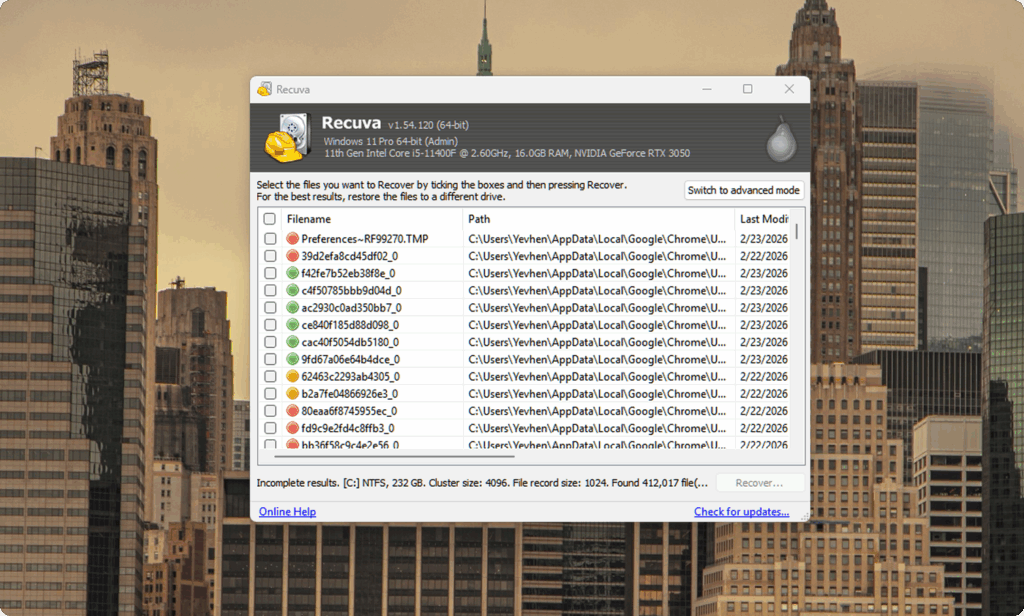
Recuva holds the second position in our list as one of the most reliable free video recovery software options for Windows users. While it does not include advanced reconstruction modules, it performs consistently in recent deletion cases and offers a straightforward recovery process without cost barriers.
The software restores video files after accidental deletion from internal drives, external HDDs, USB flash drives, and SD cards. It works best when the file system structure remains intact, and no major overwrite has occurred.
During evaluation, Recuva successfully restored recently deleted MP4 and AVI files with original filenames and folder paths preserved. Recuva provides both Quick Scan and Deep Scan modes. Quick Scan delivers fast results for recently deleted files, while Deep Scan increases the detection rate on formatted drives, although recovery quality depends on file fragmentation.
OS Support: Recuva supports Windows 11, 10, 8.1, 8, and 7. There is no macOS version available.
Software plan: Recuva offers a fully functional free version for standard recovery tasks. Recuva Professional is available as a 1-year subscription priced at $24.95, which includes automatic updates, virtual drive support, and priority customer assistance.
Top Recuva Pros:
- Fully functional free version without strict recovery size limits
- Clear step-by-step wizard that guides users through the recovery process
- Quick Scan mode for recently deleted files with fast result output
- Deep Scan option for formatted or partially corrupted drives
- A portable version that runs without installation, which reduces the overwrite risk
- Low CPU and RAM usage, suitable for older Windows systems
- Ability to sort files by condition, size, and recovery probability
Top Recuva Cons:
- Windows-only support
- Limited performance with fragmented large video files
- Basic preview functionality compared to advanced tools
Our Review: Recuva performed best in simple deletion cases. During evaluation on a recently emptied recycle bin, it restored full-length MP4 files within minutes and preserved the original folder structure without errors. Scan results appeared clearly organized, and file condition indicators helped estimate recovery probability before export.
However, recovery stability decreased on formatted SD cards that contained fragmented 4K recordings, where reconstruction proved inconsistent. For straightforward Windows recovery tasks, Recuva delivers reliable results without financial commitment.
3. R-Studio
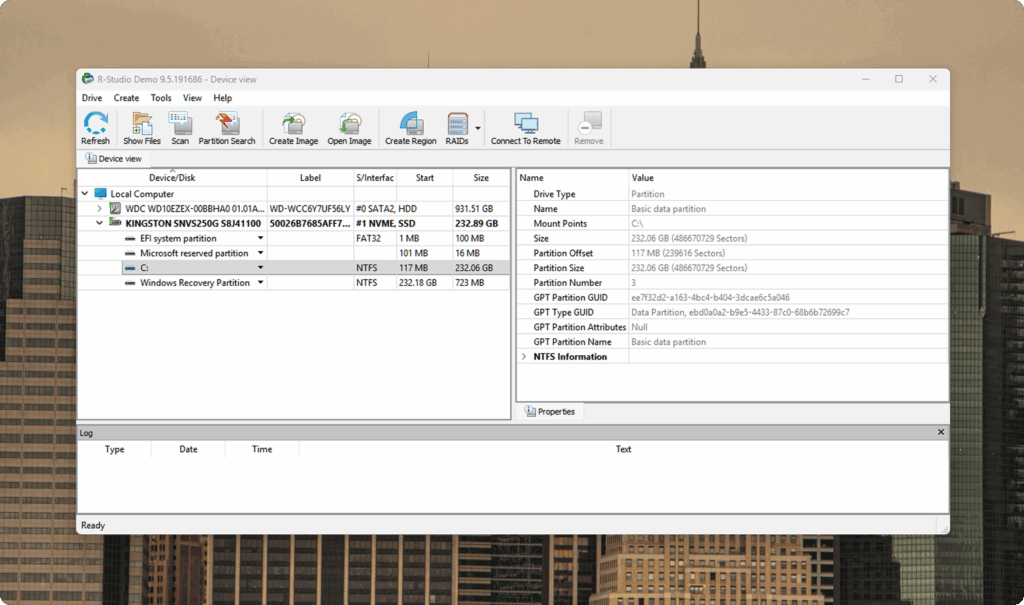
While Recuva handles recent file removal well, the third position addresses situations where storage damage becomes more severe. R-Studio targets cases that involve partition corruption, RAID failure, file system collapse, or unstable drive structure. In professional environments, it serves as a powerful deleted video recovery software option for complex recovery tasks.
R-Studio restores video files after partition loss, RAID misconfiguration, file system errors, and disk structure damage. It supports recovery from HDD, SSD, network storage, and multi-disk RAID systems. Manual scan configuration allows deeper sector analysis and custom file signature definition, which increases detection accuracy on damaged volumes. The software supports NTFS, FAT, exFAT, ext2/3/4, HFS+, APFS, and additional file systems. Video format support includes MP4, MOV, AVI, and other professional recording formats.
OS Support: R-Studio is available for Windows, macOS, and Linux. Cross-platform license options allow use across multiple operating systems.
Software plan: The standard license starts at approximately $79.99, with pricing that varies by platform. Advanced and Technician licenses cost more and target RAID recovery and commercial environments.
Top R-Studio Pros:
- RAID reconstruction capability
- Deep sector-level scan analysis
- Wide file system compatibility
- Custom file signature support
- Network drive recovery
Top R-Studio Cons:
- Interface requires technical knowledge
- Not suited for beginners
Our Review: On a damaged NTFS partition, R-Studio detected video files that simpler tools failed to locate. Manual scan configuration increased detection depth on partially corrupted storage. Restored files preserved structural integrity, although the workflow required technical knowledge. For severe storage failures and RAID-related video loss, R-Studio provided recovery capability beyond standard consumer tools.
4. PhotoRec
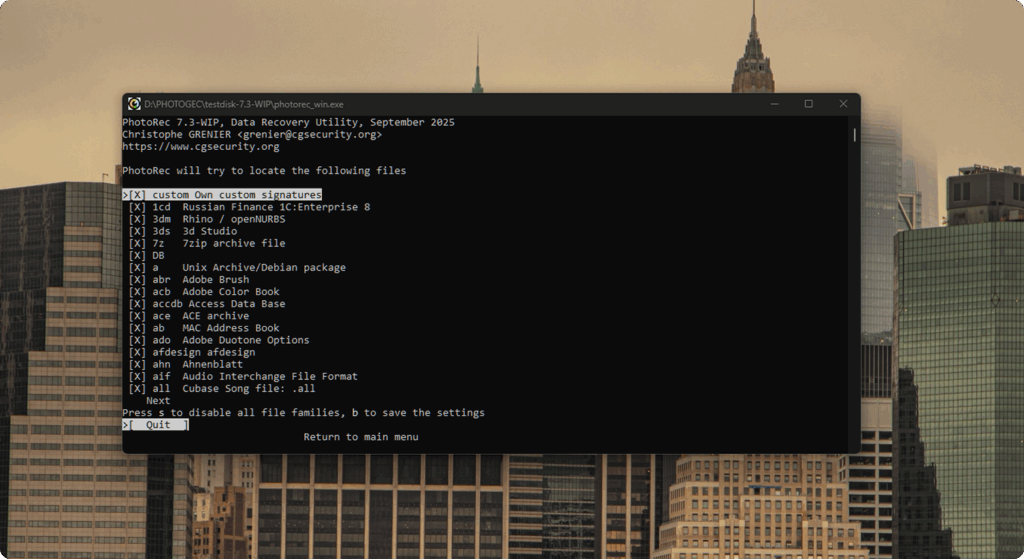
The fourth position highlights an open-source tool developed by CGSecurity. PhotoRec operates independently of the file system and reads storage at the sector level. This approach allows file restoration even after partition table damage, drive format, or severe file system corruption.
PhotoRec supports more than 480 file signatures, which include common video formats such as MP4, MOV, AVI, MKV, and many additional extensions used by cameras and recording devices. Because it relies on signature detection rather than directory metadata, it can recover files from NTFS, FAT, exFAT, ext2/3/4, HFS+, APFS, and other file systems, even when the system itself appears damaged. Recovered files do not retain original names or folder hierarchy. The program writes restored data into separate output folders organized by file type.
OS Support: PhotoRec runs on Windows (from older versions through Windows 11), macOS, Linux, FreeBSD, NetBSD, OpenBSD, and other Unix-based systems.
Software plan: PhotoRec is distributed under the GNU General Public License. It is completely free, with no file recovery limits and no commercial restrictions.
Top PhotoRec Pros:
- Support for more than 480 file signatures
- Recovery is possible even when the file system metadata is lost
- Works on a wide range of file systems
- No cost and no recovery size limits
- Cross-platform availability
Top PhotoRec Cons:
- No original filenames or folder structure after recovery
- No built-in video preview
- Command-line interface in the default version
Our Review: On a fully formatted SD card with a removed partition table, PhotoRec detected video files that remained invisible to standard file-system-based tools. Recovery results included playable MP4 and MOV files extracted directly from raw sectors. The absence of a preview required manual verification after export, and file names appeared as generic sequences.
For scenarios that involve severe partition damage or metadata loss, PhotoRec provides recovery depth that many commercial tools cannot match.
5. R-Undelete
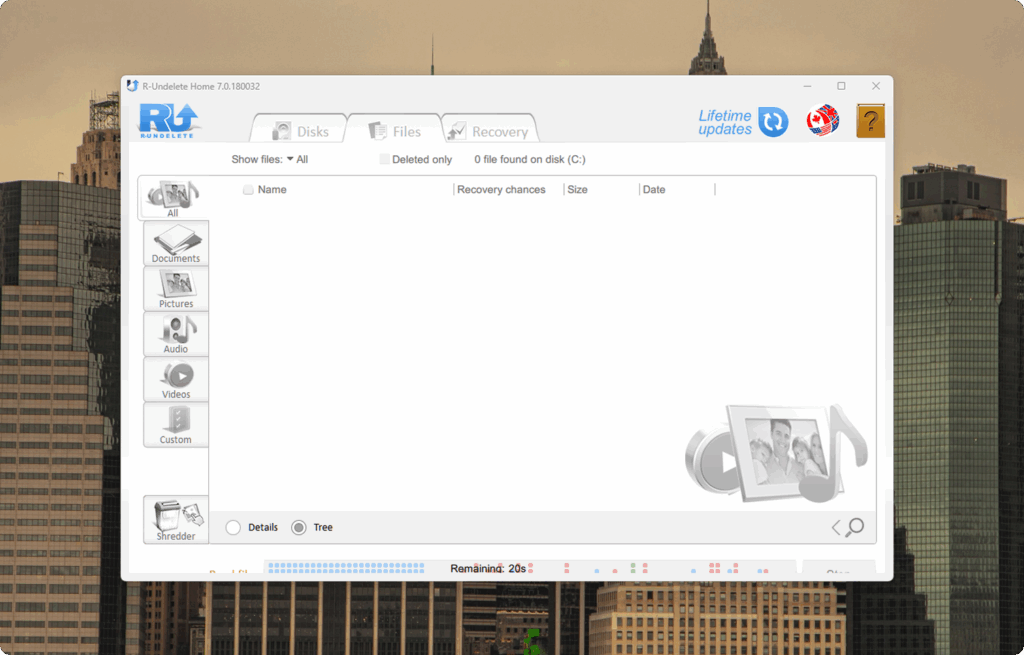
The final entry in our ranking completes the list with a practical Windows solution. R-Undelete builds on the same recovery engine used in R-Studio but presents it in a simplified structure designed for home users. Within the category of video recovery software for PC, it offers a balance between recovery depth and usability without enterprise complexity.
R-Undelete restores video files after accidental deletion, drive format, and logical file system errors. It supports FAT, exFAT, NTFS, and ReFS partitions. The program allows file sorting by type and provides a built-in viewer that verifies content before export. Disk image creation enables safe recovery from unstable drives without direct sector access during restoration.
The software handles MP4, MOV, AVI, MKV, and additional common formats. For users who require dependable video recovery software in standard Windows environments, R-Undelete delivers consistent performance in typical data-loss scenarios.
OS Support: R-Undelete runs on Windows systems and supports common PC partition formats.
Software plan: A free Home version supports recovery from FAT and exFAT file systems. The paid version, priced at approximately $54.99, unlocks NTFS and ReFS recovery and expands restoration capability for larger file sets.
Top R-Undelete Pros:
- Recovery engine derived from R-Studio
- Structured wizard interface
- Built-in file viewer before export
- Disk image support for unstable drives
- Effective recovery on NTFS and ReFS
Top R-Undelete Cons:
- Windows-only availability
- No RAID reconstruction
- Fewer advanced configuration options than R-Studio
Our Review: On a formatted NTFS USB drive, R-Undelete restored multiple large video files with stable playback. File condition indicators assisted recovery decisions and reduced uncertainty before export. Disk image support added protection when storage health appeared unstable. Although it lacks enterprise-level configuration depth, it provides reliable restoration for everyday Windows recovery cases.
FAQ
How long does video recovery take?
Recovery time depends on drive size, storage condition, and scan depth. A quick scan on a small USB drive may finish within minutes. A full sector analysis on a 1TB drive can require several hours. Fragmented or damaged storage increases scan duration. For large SD cards with 4K footage, full analysis is usually necessary.
Can recovered videos be corrupted or unplayable?
Yes, recovery does not always guarantee full structural integrity. A tool may detect file fragments but fail to reconstruct the complete video stream. This happens often with fragmented recordings or partially overwritten storage. Preview before export helps verify playback stability. If the preview fails, file reconstruction may remain incomplete.
Which software restores 4K footage most reliably?
4K video files often become fragmented, especially on SD cards from drones or action cameras. In such cases, simple recovery tools may detect the file but fail to restore stable playback. Among the tested solutions, Disk Drill (Advanced Camera Recovery module) showed the most consistent results with large 4K recordings, particularly on formatted memory cards. R-Studio also performed well in complex partition damage scenarios, though it requires more technical knowledge.
Conclusion
To finish this comparison, here’s where we land. Based on direct evaluation across multiple failure scenarios, Disk Drill delivered the most stable and predictable recovery results. It handled fragmented 4K footage, formatted SD cards, and damaged partitions with higher structural accuracy than other tools in this ranking.
Beyond our own testing, public discussions also reflect a similar user experience, as seen in this thread, where many users share real safety thoughts, recovery outcomes, and practical feedback.
Still, no tool fits every case. R-Studio proves stronger in RAID environments, PhotoRec performs well after severe partition loss, and Recuva remains useful for simple deletions without cost. As more recovery utilities appear on the market, reconstruction stability and playback integrity matter more than price alone. For most common and advanced recovery cases, Disk Drill remains the most consistent option and the best video recovery software in this list.