












SilverStone ECM40 PCI Expansion Card for NVMe SSDs Review

Earlier we tested ECM24 and ECM26 expansion cards from SilverStone. This time around, we are taking a look at their newly released ECM40 which is a PCIe Adapter Card to add up to 4x PCIe Gen4 M.2 NVMe drives. This expansion card has a full x16 slot which needs bifurcation in 4×4 or 4×2 or 8×2 or even 8x4x4 lanes to make the connected drives available. This seems to be a basic pass through with controller requiring lane bifurcation.
This expansion card has MSRP of USD 99.99. Minimum warranty is 1 year, depending on the region.
Specifications

Packaging and Contents

The product is shipped inside a cardboard box in blue and white which is SilverStone’s standard theme.
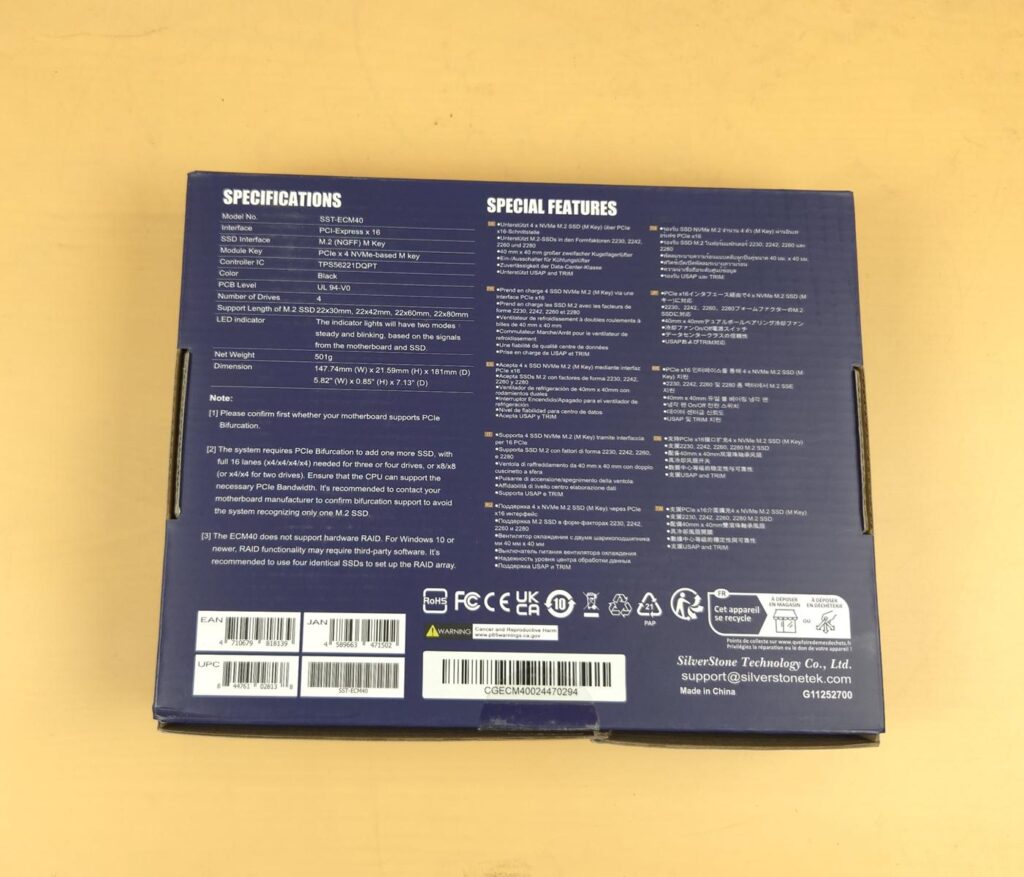
Specifications and salient features are printed on the backside of the packing box. This card supports only M type M.2 drives.
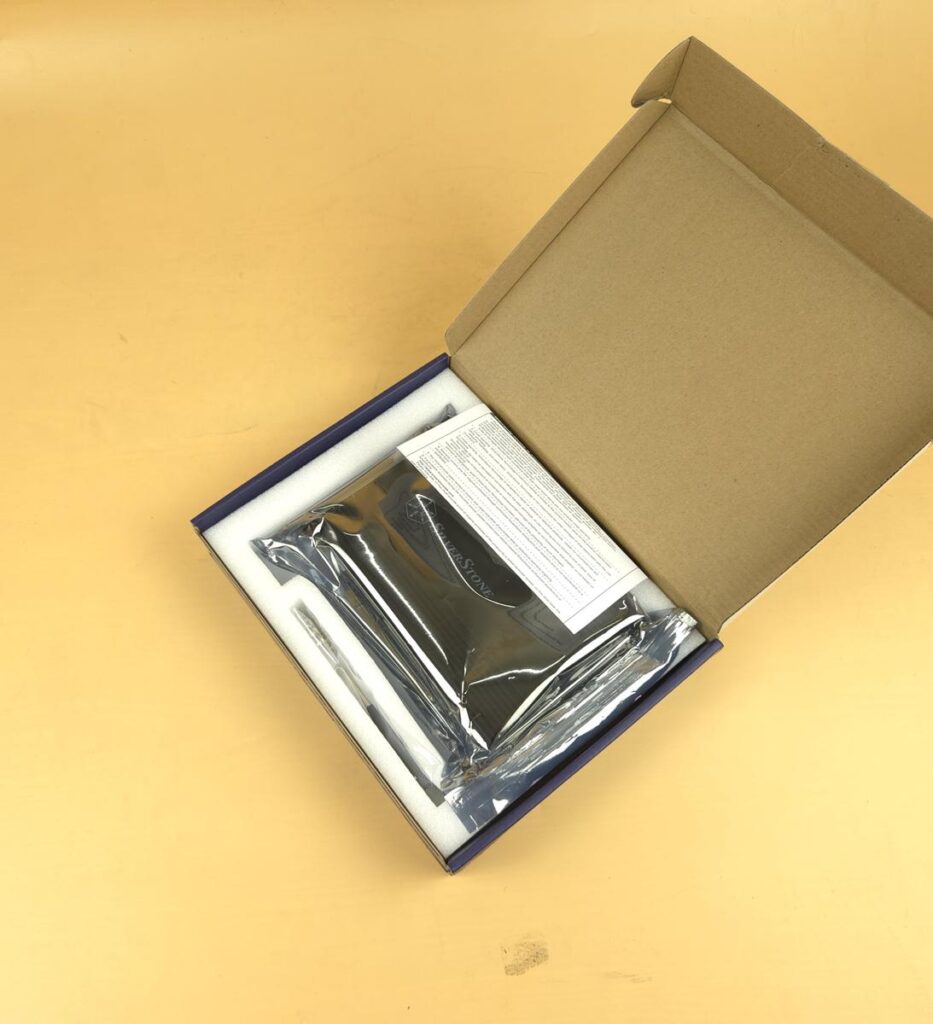
The PCIe card is placed inside a transparent container in a Styrofoam pad along with the accessories.

The SilverStone has provided:
- 1x ECM40 card
- 6x M.2 Flathead Screws
- 6x M.2 SSD Standoffs
- 1x Screwdriver
- 1x Warranty Paper
Closer Look
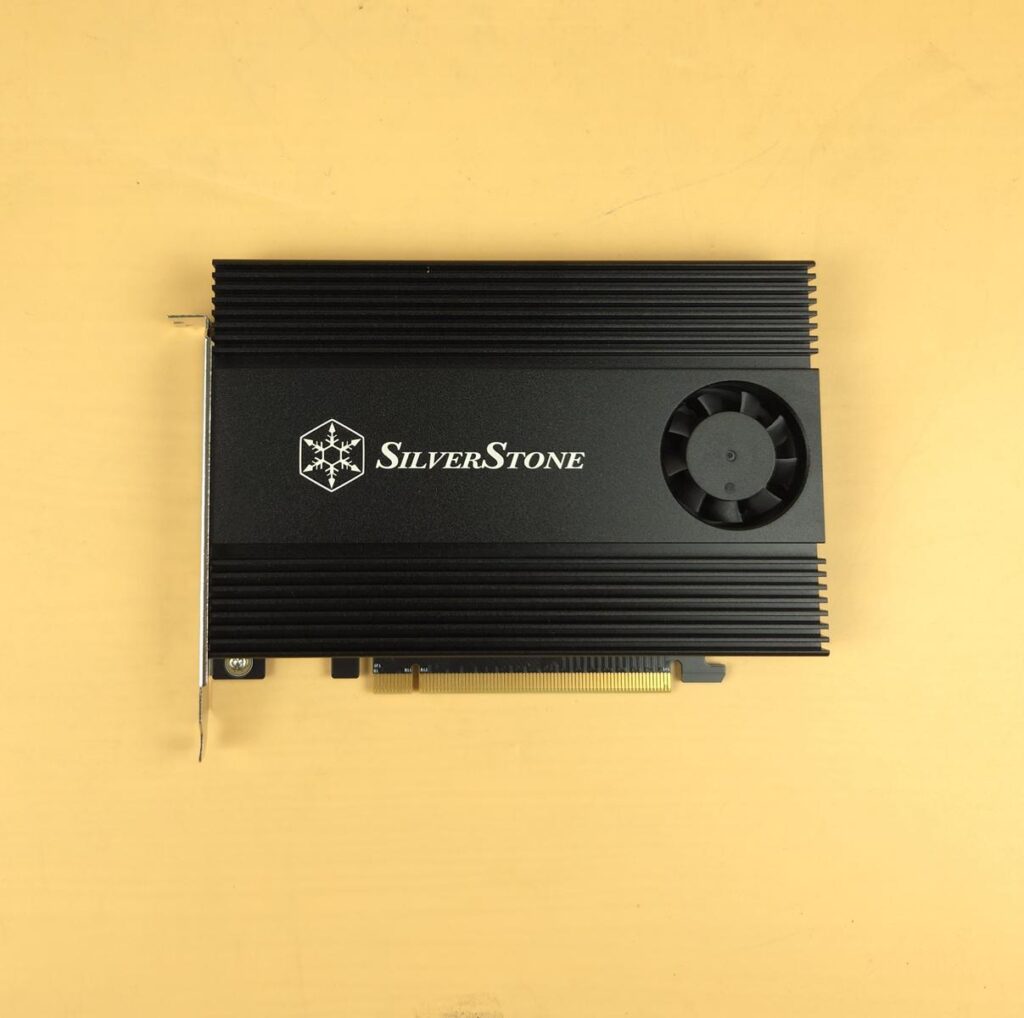
The ECM40 has a dimension of 147.74×21.59x181mm (WxHxD) having a weight of 501gm without drives. The bulk of this weight comes from the heavy heatsink on this card. The top view or front view shows a full size aluminum heatsink with a side mounted fan. This is active and passive cooling solution since we have a dedicated button to power on/off the fan. The operating temperature range is 5ᵒC to 55ᵒC.
The heatsink has a dimension of 109.3×14.2x168mm (WxHxD). The center of the heatsink has SilverStone branding. The card has a full x16 PCIe connector. The integrated fan is 40x40x10mm having a speed of 7000±10% RPM. It uses double ball bearings. User has no control over the speed regulation of this fan.

The backside of the card shows black PCB with spacing holes for the supported length drives. The product is made in China. You can see a serial number sticker as well. The heatsink is secured with the PCB using 4x screws. There is no additional support for the bulky heatsink to take the pressure off the PCB.

This is a single slot design. You can see a switch with Off and On label. This switch powers on and off the fan. Switching the fan off will make this passive cooling solution. The aluminum heatsink has more surface area and the inside the case, airflow would help take the heat off the surface.
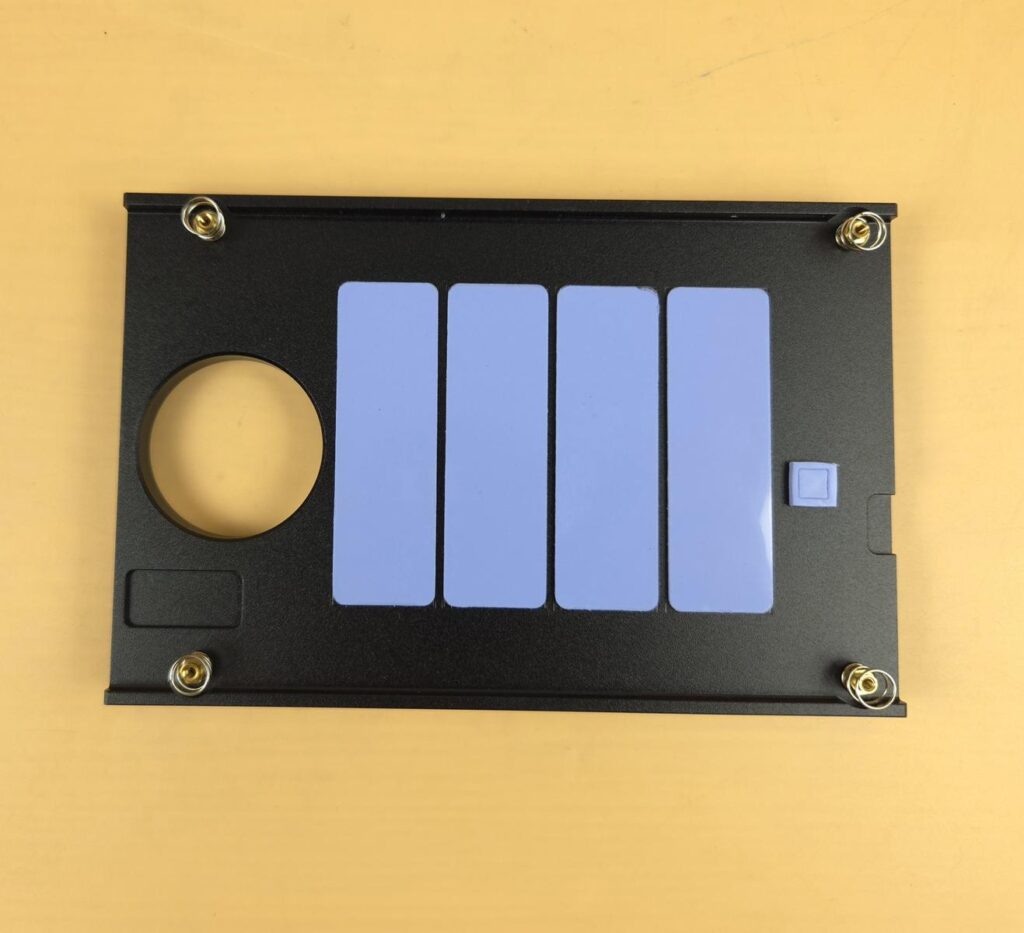
I am showing the inner side of the main heatsink cover. It has 4x blue thermal pads for the M.2 ports and a small size blue thermal pad for the controller. These thermal pads have a thickness of 1mm and rated for 3W/mK conductivity. The main four pads have a dimension of 22x1x70mm (WxHxD).
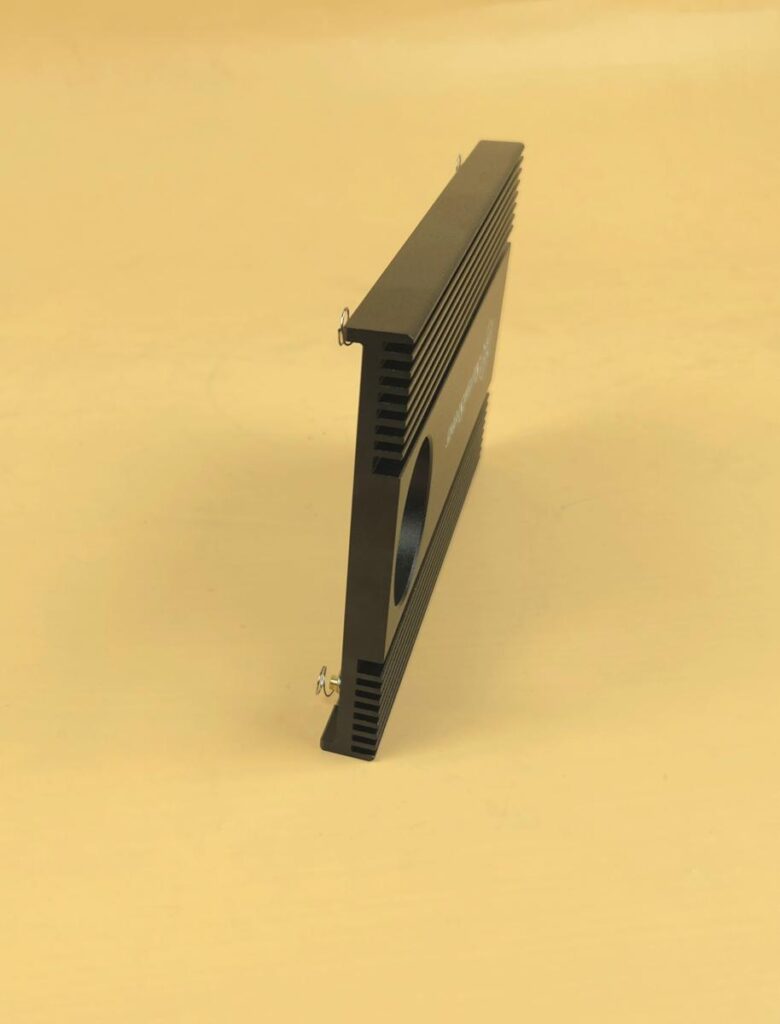
The thickness of the aluminum heatsink is 14.2mm with a height of 109.3mm. This gives the adapter a size of about an average graphics card.

I have removed the heatsink cover and it shows the black PCB. The PCB level is UL 94-V0. You can see 4x M.2 ports. These ports can only house M Key M.2 drives in a form factor of 2230, 2242, 2260, and 2280. The M.2 studs come pre-installed on a 2280 size.
The main controller is TPS56221DQPT. This controller requires dividing the main PCIe x16 lanes into 4×4 lanes, providing x4 lanes dedicated to each M.2 port. This means your motherboard needs to have PCIe lanes bifurcation support; otherwise, this card will give access to only one SSD, regardless of the total installed drives.
Installation
Let’s begin with the installation.

You have to remove the installed M.2 studs. Remove the screws on the backside of the PCB for this purpose. SilverStone could have provided these studs in the accessories to save this additional step.
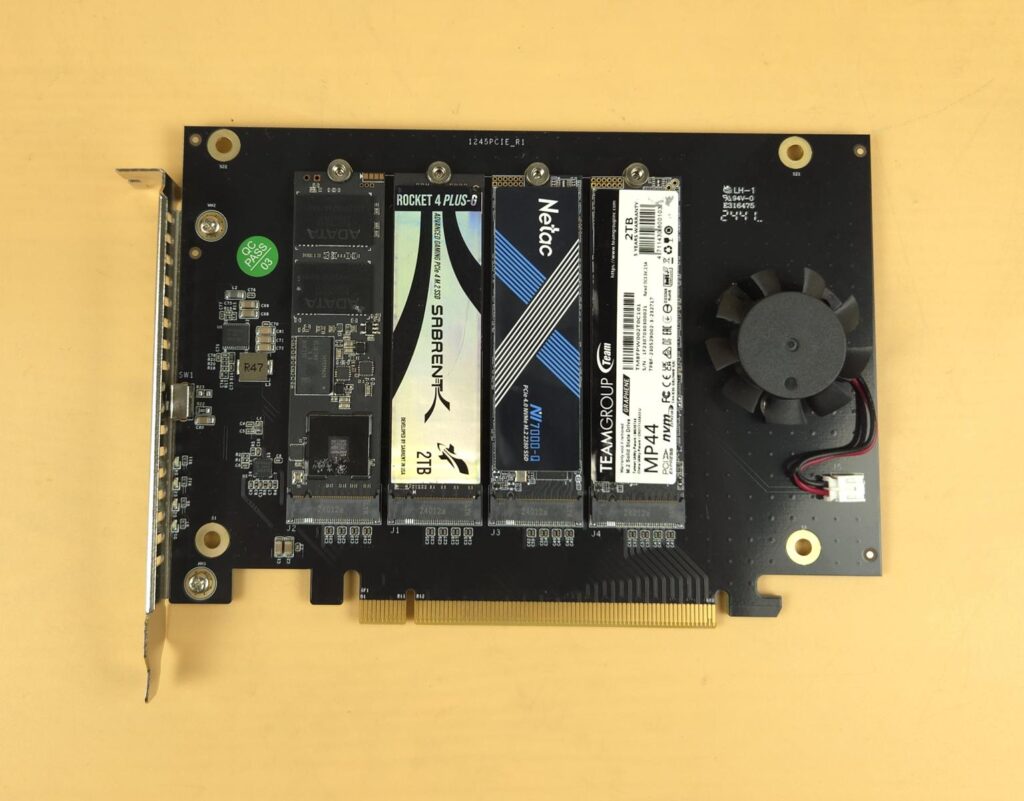
Ideally, I would want to use the same type/style SSD so that thermal pads could make even contact and of-course to help with the software based RAID setup. Anyhow, I did with whatever I had available to test the card. Install the M.2 drive in 20ᵒ angle on the M.2 port. Connect the stud to the opposite end and make it sit over the mounting hole. Secure it using a screw from the backside of the PCB. Repeat the process for the number of drives required to be installed.
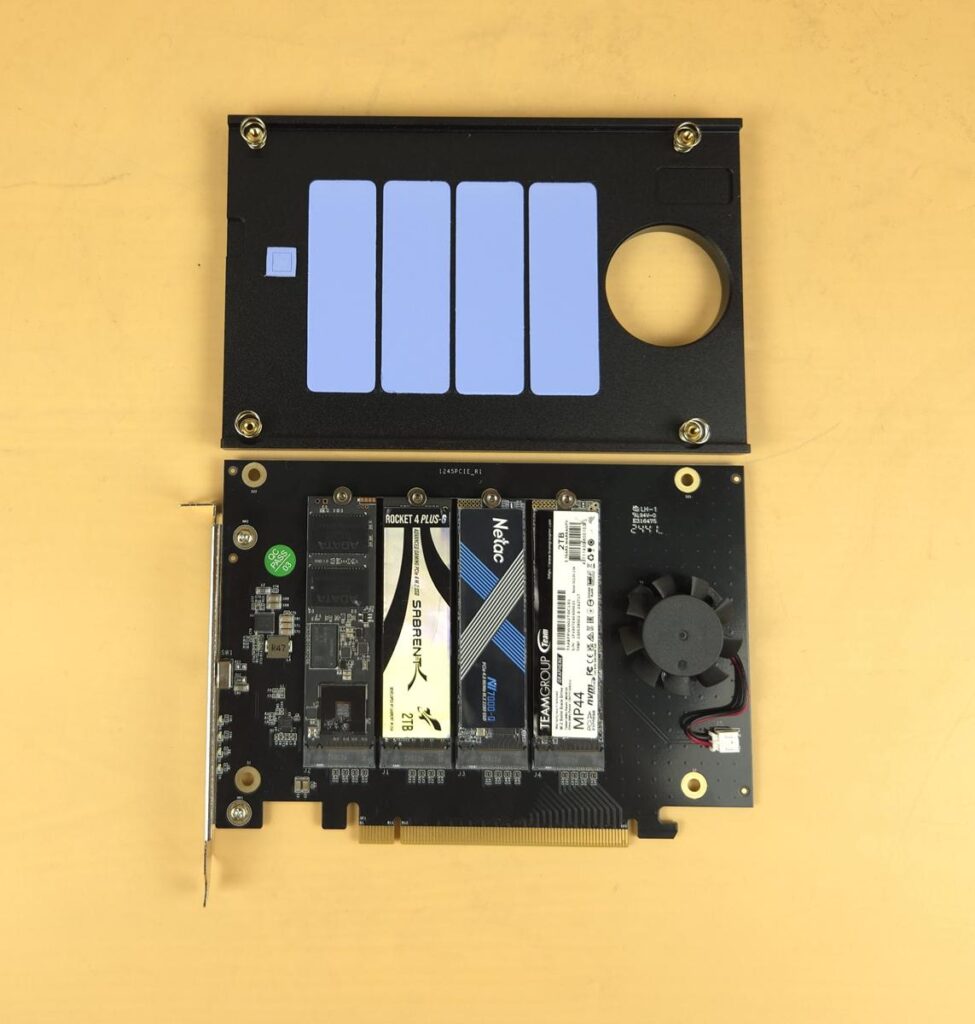
Peel off the protective cover from the thermal pads and place the heatsink over the card. Secure it using 4x screws from the backside of the PCB. You are good to go.
Testing
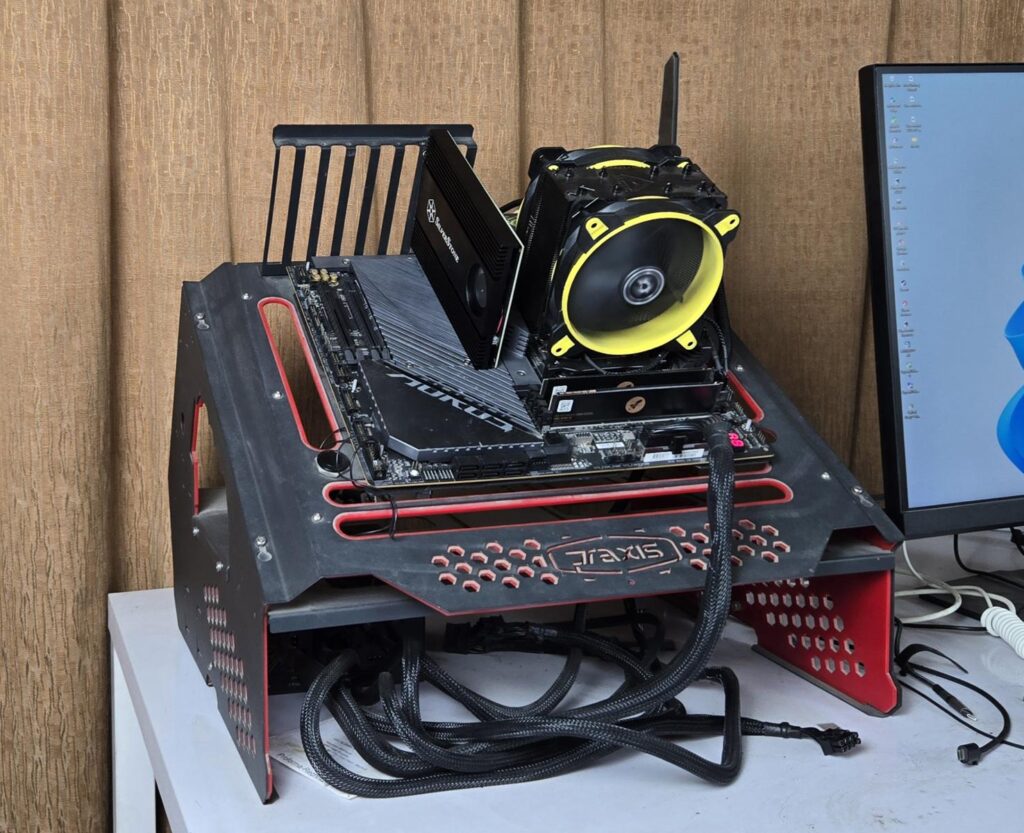
I have used below configuration:
- AMD Ryzen 9 7950X
- GIGABYTE X670E AORUS MASTER
- Sabrent Rocket 32GB DDR5 kit @ 4800MHz
- ARCTIC Freezer 27 eSports Duo
- XPG S70 Lite 1TB [For OS]
- Sabrent Rocket 4 Plus 2TB NVMe [For data]
- XPG S70 Blade 2TB NVMe [Drive 1 on the card]
- Sabrent Rocket 4 Plus Gaming 2TB NVMe [Drive 2 on the card]
- Netac NI-7000Q 2TB NVMe [Drive 3 on the card]
- Teamgroup MP44 2TB NVMe [Drive 4 on the card]
- Be quiet! Straight Power 11 850W Platinum PSU
- Praxis Wetbench
As mentioned, your motherboard needs to have PCIe Lanes bifurcation support otherwise only one SSD will be accessible.
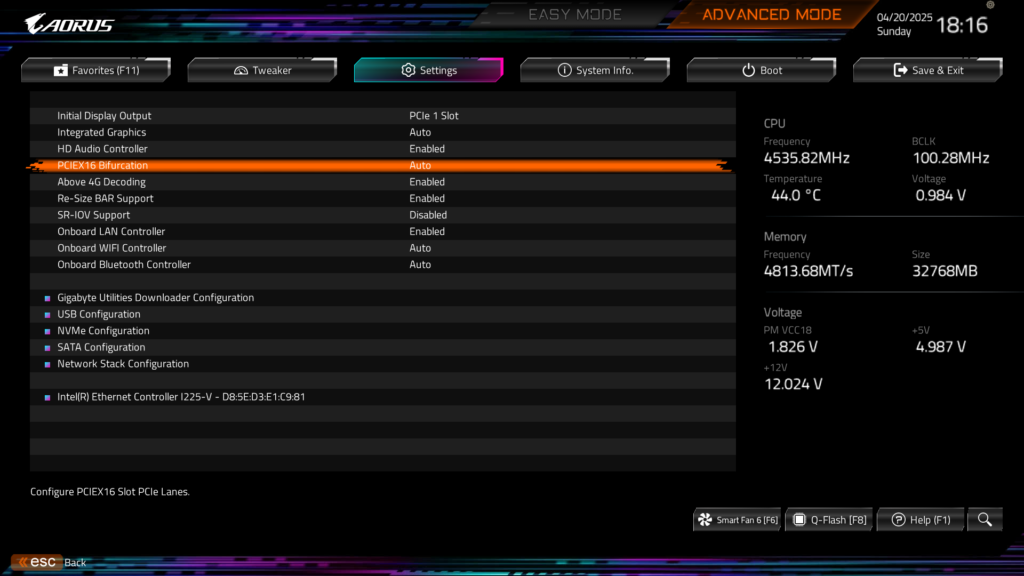
You can check for this option in the motherboard’s manual. ASRock X870E NOVA WiFi and Z890 NOVA WiFi don’t have this support. The MSI Z790 ACE MAX has x8/x4 support only. However, GIGABYTE X670E AORUS MASTER supports up to x4/x4/x4/x4 lane bifurcation from x16. You can find this option in Advanced Menu.
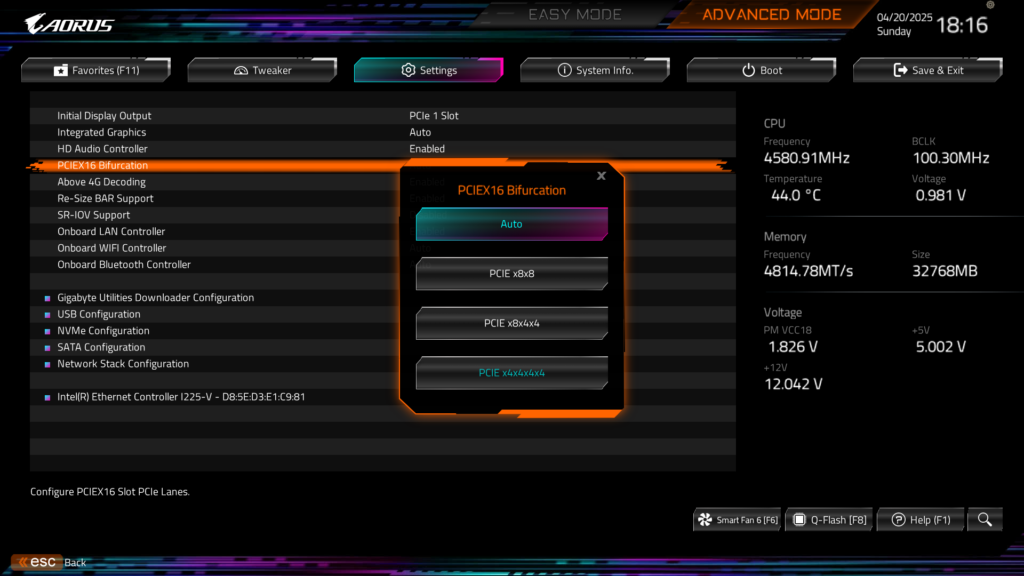
You can see the available bifurcation options which are x8/x8, x8/x4/x4, and x4/x4/x4/x4. What is the implication of these options? Here is the answer:
| Bifurcation option/configuration | M.2 Drives that will be accessible |
| X8/x8 | 2x M.2 Drives |
| X8/x4/x4 | 3x M.2 Drives |
| X4/x4/x4/x4 | 4x M.2 Drives |
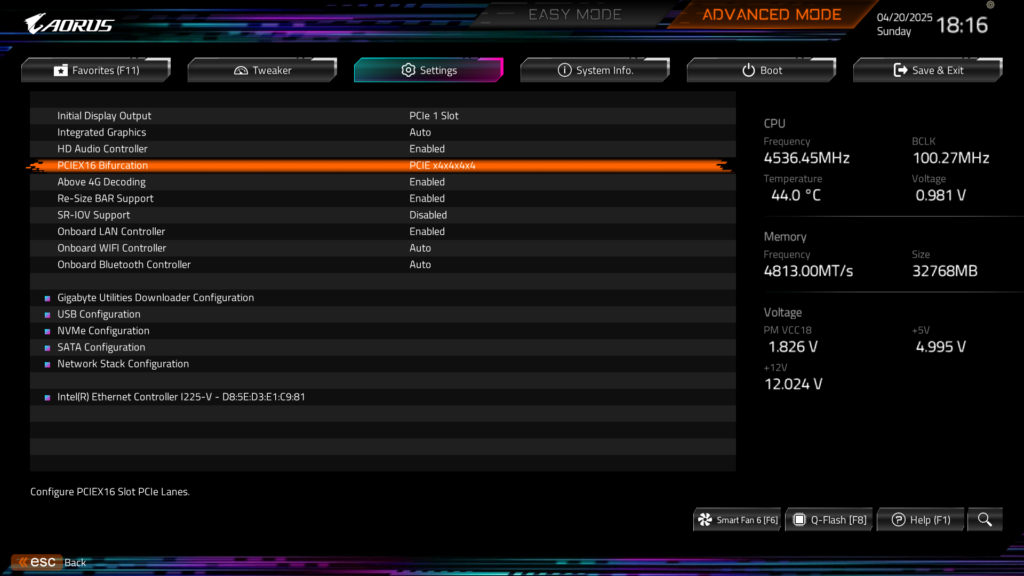
You can see that I have enabled the full 4 slot bifurcation in which each slot on the PCIe card will get x4 lanes. This is what you need for ECM40.
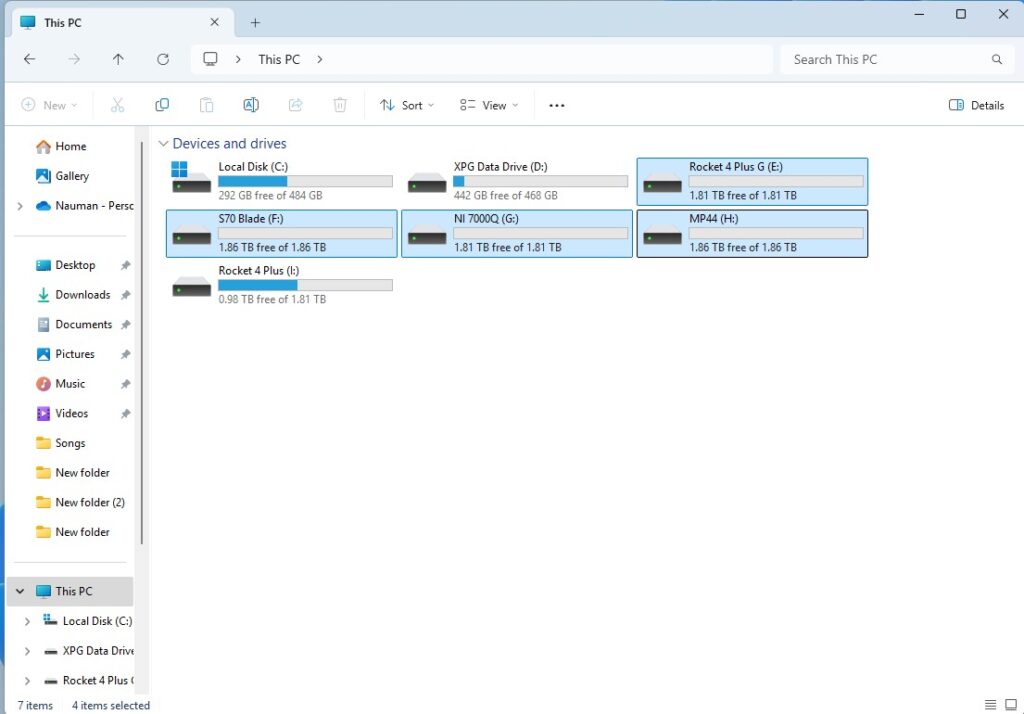
You can see that all four drives appear in the My Computer in addition to two M.2 drives which are directly installed on the motherboard’s M.2 slots. However, I had to remove the graphics card for this purpose. Keep that in mind. Of-course you can install one or two drives in the ECM40 and use x8/x8 or x8/x4/x4 bifurcation depending on the available PCIe slots on the motherboard and still get to have the graphics card.
Next, I ran CrystalDiskMark one by one on each drive.
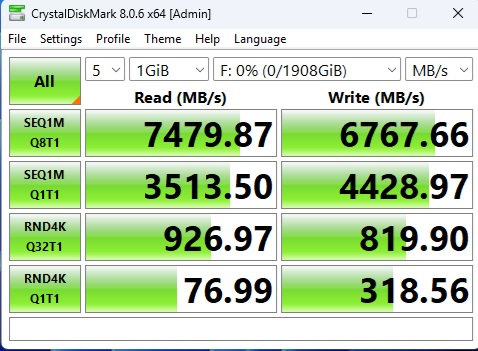
Above is a CDM run XPG S70 Blade.
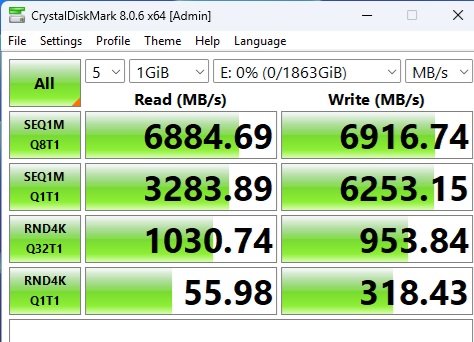
Above is a CDM run on Sabrent Rocket 4 Plus-G.
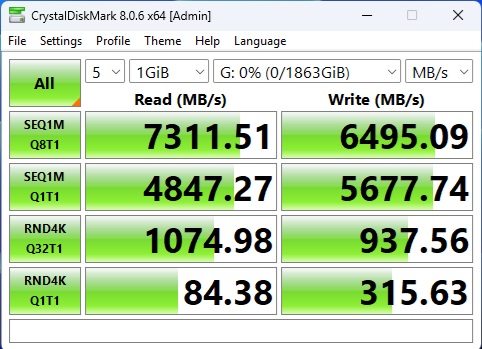
Above is a CDM run on Netac NI-7000Q.
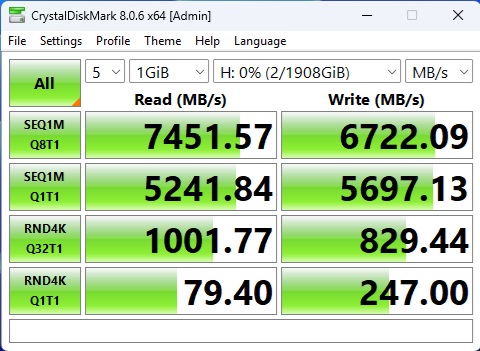
Above is a CDM run on Teamgroup MP44.
The Random 4K IOPS have a slightly low score overall, but sequential speeds are good.
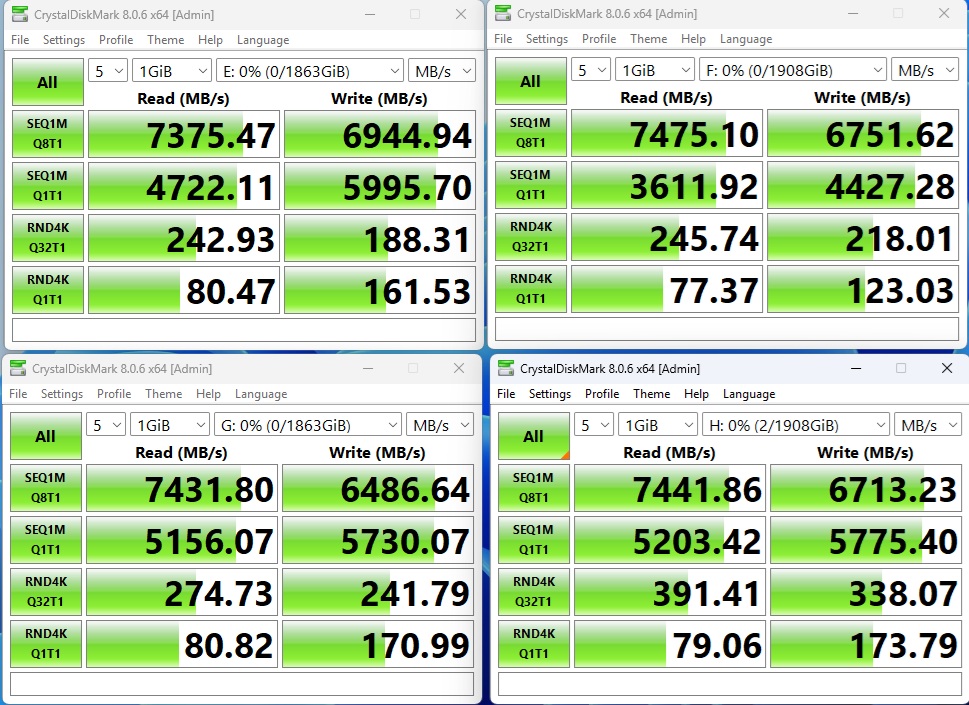
Next, I ran CrystalDiskMark simultaneously on all 4 drives. You can see only the Random 4K Q32T1 has a hit; this way, the other test results are fine.
Thermal Testing
The ECM40 fan was on during the testing. I customized the CrystalDiskMark to run for 18 minutes continuously on sequential read and write speeds simultaneously on four drives. I wanted to see the thermal behavior of the drives and the ECM40.
| Drive | Maximum Temperature |
| XPG S70 Blade 2TB NVMe SSD | 74ᵒC |
| Sabrent Rocket 4 Plus-G 2TB NVMe SSD | 74ᵒC |
| Netac NI-7000Q 2TB NVMe SSD | 68ᵒC |
| Teamgroup MP44 2TB NVMe SSD | 75ᵒC |
These thermals are within acceptable margin. One key factor here is the varying thickness of these drives that could have impacted the thermal pad contact with the drives. However, the heatsink itself was not hot as I was able to touch it comfortably. Unfortunately, my thermal camera is with my colleague for other testing, otherwise I would have taken a picture of the heatsink for hot spots.
Conclusion
ECM40 is a PCIe Adapter card that allows user to expand storage capacity. This card can house up to 4x PCIe Gen4 M.2 NVMe (M Key) drives. The dimension of this card is 147.74×21.59x181mm (WxHxD). It comes equipped with a massive aluminum heatsink having a dimension of 109.3×14.2x168mm (WxHxD). This bulky heatsink contributes to 501gm net weight of the card without drives.
This card has 40x40x10mm fan which can be turned off or on. The passive cooling is possible thanks to power switch and large surface area on the heatsink. This card is driven by TPS56221DQPT controller which needs bifurcation of x16 lanes into 4×4 lanes via motherboard. If motherboard does not have this feature, then only one SSD will be accessible. Bifurcation can be x8/x8 or x8/x4/x4 or full x4/x4/x4/x4 depending on the motherboard model and CPU lanes.
Please keep in mind that not all consumer grade motherboards have this feature. The prosumer grade like X99/X299/X399 or workstation/server boards (not old) have a better chance of providing this feature. Even if your motherboard on latest platforms like LGA1700/1851 and AM5 can provide dual bifurcation, you can use this card with limited access.
The supported M.2 drive form factor is 2230, 2242, 2260, and 2280. SilverStone has provided M.2 studs and screws in the box. The heatsink comes with pre-applied thermal pads of 1mm thickness having 3W/mK conductivity rating.
This card does not support RAID. However, you can use software based RAID if on Windows 10 and above. The heatsink has spring load screw mechanism. Still, I would suggest using same type of drives to ensure optimal contact between the pad and drive for better heat dissipation.
The installation is simple and convenient. You don’t need anything as everything is provided in the box including a screwdriver. I have tested the card on GIGABYTE X670E AORUS MASTER since this motherboard supports 4×4 bifurcation. Each drive appears separately and can be accessed individually. Running CrystalDiskMark simultaneously on these 4 drives did not result in a performance hit on sequential speeds but it did on the Random 4K Q32T1 speeds. The individual run of CrystalDiskMark shows satisfactory results.
The thermal performance is adequate as well. I stressed all four drives at a same time to represent the worst case scenario and drives were within their rated thermal limits although it is slightly elevated temperature but drives did not throttle and maintained speeds. This card is listed at USD 99.99 and comes recommended by us.